Every service on short-lived credentials from Vault, and every production session requested, approved and audited, behind one command.
ArborXR · Staff Platform Engineer
Credential rotation
6 months → 24 h
Downtime per rotation
zero
Production access
requested · approved · audited
HashiCorp Vault
Vault Secrets Operator
HashiCorp Boundary
Kubernetes
Pulumi
Google OIDC
Slack
Deno
The problem
Credentials were rotated every six months. Fixing that meant answering four questions at once: where do secrets live, how do they rotate on their own, how do we stop credential files from lying around, and how does all of it work in Kubernetes without a person in the loop?
Options
Sealed Secrets keeps encrypted secrets next to the infrastructure code and is easy to set up. But encrypted values are hard to read, the encryption key is created and stored by hand (lose it and everything is lost), and every change means building a new SealedSecret by hand.
Other common answers: Mozilla SOPS, AWS and GCP Secret Manager, Infisical, Bitwarden, 1Password.
HashiCorp Vault is secure by default, supports many auth methods (OIDC, JWT, LDAP, GitHub, tokens), is production-ready, and has a simple UI and a large ecosystem. Its cost is that it's complicated to set up and run, so most of the work below goes into automating that away.
What I built
Vault, set up by a job
Vault runs in-cluster in high-availability mode with Raft storage, auto-unseals through the cloud KMS, and uses workload identity to reach cloud services. Nobody runs the setup by hand: a Kubernetes Job, part of the infrastructure rollout, waits for Vault to come up, initialises it, stores the recovery keys in Secret Manager, enables the secret engines, policies and roles, and finally revokes the root token.
Secrets into Kubernetes
The Vault Secrets Operator (VSO) syncs secrets from Vault into native Kubernetes Secrets, detects and reconciles drift, and restarts the deployments that use a secret when its value changes. It authenticates with Kubernetes service-account tokens, rotates its own tokens, and each role is scoped to specific namespaces and policies.
[ FIG. 1 ] Vault and the Vault Secrets Operator inside the cluster
Dynamic database credentials
Static secrets were only the first step. Vault's database engine creates a database user per lease from a creation statement and removes it with a revocation statement. Services receive credentials that rotate every 24 hours with zero downtime: VSO renews the lease, writes the new credentials and restarts the deployment.
People, through Boundary
Developers reach databases and clusters through HashiCorp Boundary: a controller with Google sign-in, and a worker inside each environment's network. Vault brokers short-lived credentials into each session, whether that's a database user or a Kubernetes service account for exec-ing into pods.
[ FIG. 2 ] People reach private services through Boundary, with credentials brokered by Vault
Just-in-time approval
Production is protected. You give a reason, the request lands in Slack, and an approver clicks approve. The approval creates a temporary Boundary role that lets that one person authorize a session on that one target, then deletes the role seconds later. The session keeps running; the permission doesn't.
One command
A small CLI wraps all of it: Google sign-in, pick the environment and the target, wait for approval when it's production, open the tunnel, and launch the database client with the brokered credentials already filled in.
[ FIG. 3 ] What one command does
Results
Credentials rotate every 24 hours, with zero downtime, instead of every six months.
Production sessions are requested, approved in Slack and audited.
Every session gets short-lived credentials brokered by Vault.
Vault and Boundary set themselves up as part of the infrastructure rollout, with the root token revoked at the end.
I've spent 10+ years building software and 7+ building the platforms other engineers ship on: from a bare-metal Kubernetes cluster in the data lab of one of Canada's biggest insurers, to GitOps, dynamic secrets and AI agents that hold zero credentials. At ArborXR I build the platform and champion our AI work.
Moved push-based IaC deploys out of GitLab CI/CD into GitOps with FluxCD: pipeline time from >20 min to <5 min, pipeline failure rate below 1%, deploys from weekly to several hundred per week.
Rolled out HashiCorp Vault and Vault Secrets Operator so every service uses dynamic credentials, rotated every 24 hours with zero downtime instead of every 6 months. → case-studies/dynamic-credentials.md
Built a request-based Boundary workflow that gives developers just-in-time, temporary, audited access to services in private VPCs, following least privilege. → case-studies/dynamic-credentials.md
Co-designed the internal developer platform: self-serve ephemeral review environments that run the full product stack in a vCluster from any feature branch, via Pulumi and FluxCD. Deploy notifications go to Slack and Linear, and environments tear down automatically after the merge request closes. The shared-cluster design keeps a full-stack environment at about $9/day in its own compute and storage, roughly 15× cheaper than a dedicated-cluster environment. → case-studies/review-environments.md
Extended that platform into an internal knowledge-sharing product: SSO-gated artifact hosting with versioning, inline comments and review workflows, exposed through an MCP server and agent skill so teams publish AI-generated reports and dashboards straight from their AI tools. → case-studies/review-environments.md
Cut GCP costs by over 40% year over year while usage grew: spot VMs in production with 100% uptime for critical high-availability workloads, right-sizing that cut compute and memory allocations by over 30%, and automated cleanup of unused clusters and review environments.
Led the adoption of agentic AI in platform engineering.
Shipped the company's first production MCP server (Laravel MCP), replacing a 1:1 OpenAPI mapping of 160+ endpoints with 23 hand-curated tools so agents reason better. → case-studies/ai-assistant.md
Shipped an in-app AI assistant (Oct 2026) that answers questions about a customer's device fleet inside the ArborXR portal. Its tools run with the signed-in user's own permissions, pluggable guardrails (TypeSafe's Jev model) screen input for jailbreaks and abuse, and answers stream in as they're generated. → case-studies/ai-assistant.md
Built zero-credential agents on the Claude Agent SDK. Agents hold no credentials: every call leaves through a gateway that injects credentials at the edge, and each run gets a short-lived signed token, scoped to the connections it may use and validated offline at the gateway. An agent registry defines the agents, grants their access and issues the tokens. Built, deployed and tested internally. → case-studies/zero-credential-agents.md
Designed a self-serve cloud environment that lets non-technical staff deploy internal projects.
[ FIG. 2 ] AI
/ How I work
Plan the work, fan it out to parallel coding agents in isolated worktrees, and gate every change on tests and an independent cross-model review.
[ FIG. 3 ] How I work
/ Virtual office
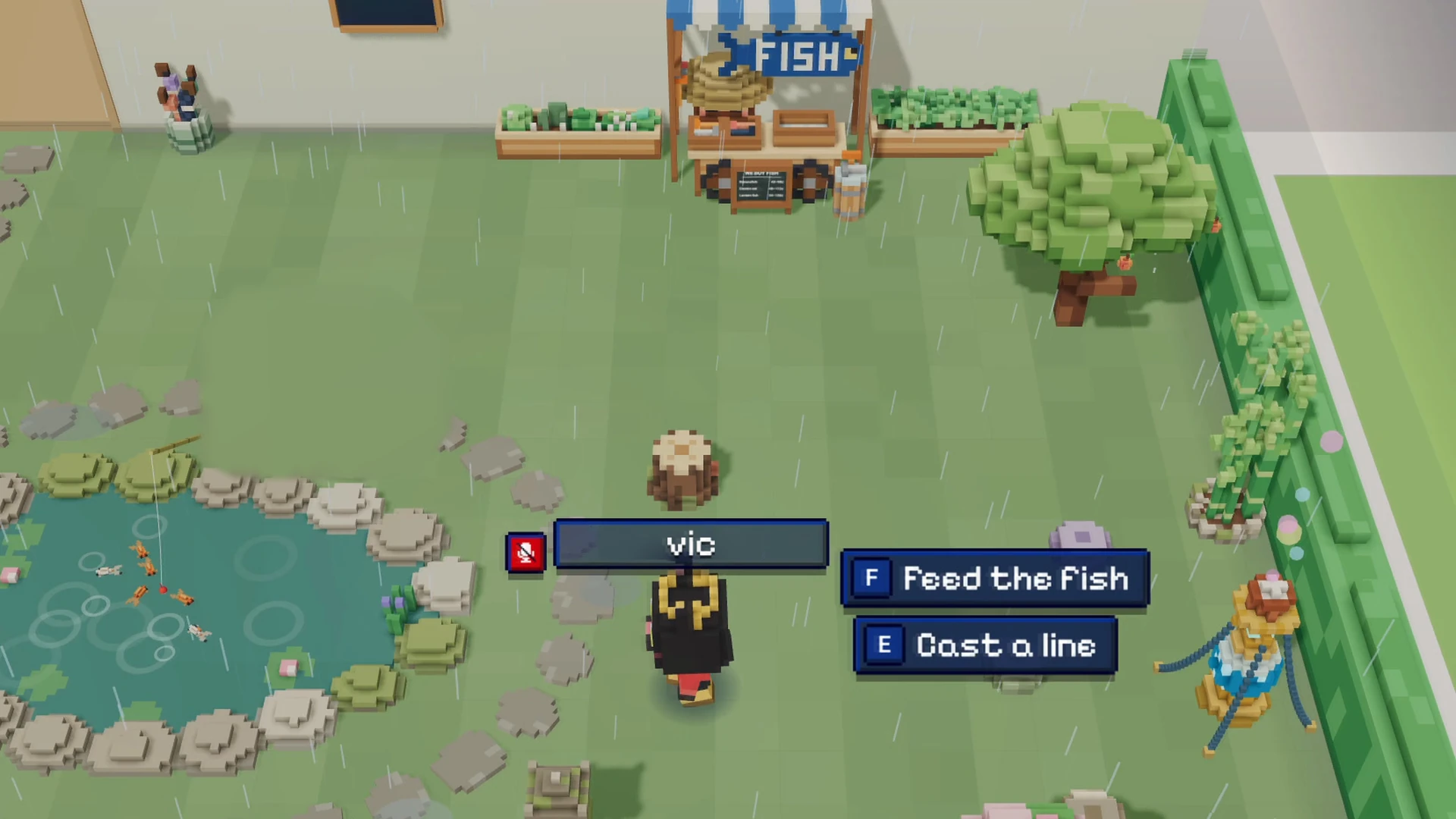
A virtual office I built for my team: a 3D voxel office in the browser with proximity voice, screen sharing and games (pool, ping pong, darts, mini-golf, racing), plus a Hall of Fame. → case-studies/virtual-office.md
Built in a day by orchestrating parallel AI coding agents: kickoff to production in about 1 h 40 min, with 643 tests passing by the end of day one.
As of Oct 21, 2026, 26 days after the first commit: 1,600+ commits, and 12 coworkers have committed to it.
Agents on the Claude Agent SDK that hold no credentials, where every call leaves through one gateway that checks a short-lived run token and injects the real credentials at the edge.
Container images for amd64 and arm64, built in parallel on matching GKE node pools and merged into one, with no privileged containers.
Kaniko
GitLab CI
GitLab Runner
manifest-tool
GKE
Pulumi
[ VIDEO ]
Virtual office
A 3D voxel office in the browser, built in a day, that the team made its own.
Side project for my team
Kickoff to production
~1 h 40 min
Tests by end of day one
643
Commits in 26 days
1,600+
Coworkers committing
12
three.js
TypeScript
Cloudflare Workers
Durable Objects
LiveKit
Vitest
Playwright
Why
Remote teams lose the hallway. I wanted a place to hang out between meetings and on Friday afternoons, where you can walk up to someone and just talk.
What it is
A 3D voxel office in the browser. You walk around as a character you design (human, animal or a special skin), talk to whoever is near you with proximity voice, share your screen to a TV in a private pod, and play: pool, ping pong, darts, mini-golf and racing, with a Hall of Fame for the best scores. There's a koi pond to fish in, too.
How it's built
The client is three.js and TypeScript, served by Cloudflare Workers. A Durable Object holds the live office state, so there's no server to run.
Proximity voice and screen sharing run on LiveKit.
Sign-in is the company's Google Workspace.
Every push to main runs the checks, deploys, and smoke-tests production.
[ FIG. 1 ] No server to run
Built in a day
I planned the work, then fanned it out to parallel AI coding agents, each in its own git worktree. Kickoff to production took about an hour and forty minutes. By the end of day one, 643 tests passed, and a second batch had shipped mini-golf, a Hall of Fame and flag sweaters.
[ FIG. 2 ] From kickoff to 12 coworkers committing
Fixing the lag
With two people walking around, remote avatars stuttered. A simulation of the real interpolation code over a modelled network found two causes: the playout buffer shrank by the one-way latency, and the clients' sends beat against the server's snapshots. Past about 67 ms of round-trip time, remote avatars froze between snapshots, on 38% of frames at 120 ms and 81% at 250 ms. An arrival-aligned playout clock brought stalls under 1% from 10 to 250 ms.
[ FIG. 3 ] Frames with frozen remote avatars, before and after
Rendering was never the bottleneck: measured on an M3 Pro, frames held 60 fps with 0.8–1.6 ms of main-thread work each.
What happened next
Twenty-six days after the first commit, the repo had more than 1,600 commits, and 12 coworkers had committed to it, adding features and fixes.
An assistant inside the ArborXR portal that answers questions about a customer's device fleet, built on the company's first production MCP server.
ArborXR · Staff Platform Engineer
MCP tools
160+ → 23
Chat panel bundle (gzip)
154 → 50 kB
Tools run as
the signed-in user
Laravel
Laravel MCP
Claude
Anthropic PHP SDK
FrankenPHP
AG-UI
TanStack AI
Preact
TypeSafe Jev
The problem
Customers manage their device fleets in the ArborXR portal. AI agents can answer questions about that data through an MCP server. The starting point was a 1:1 mapping of the OpenAPI spec: more than 160 endpoints, each its own tool.
MCP only helps people who can wire it up. The assistant was aimed at non-technical users, and at regulated, education and enterprise IT customers who can't sign up for third-party LLMs or wire up MCP themselves. They needed answers inside the portal, with no setup.
What I built
A curated MCP server
I built the company's first production MCP server, on Laravel MCP. I replaced the 1:1 mapping with 23 hand-curated tools, so agents reason better. Every tool is read-only. Every call runs as one user in one organization, resolved from that user's access token.
[ FIG. 1 ] From one tool per endpoint to 23 hand-curated tools
Tools in-process, as the user
Every vendor reference architecture I checked runs an assistant's tools in-process, under the caller's own identity, with no separate identity service. So the assistant lives inside the portal and calls the MCP server's tool classes directly, with no HTTP hop. Its tools run with the signed-in user's own permissions. Each request builds its own tool list from those permissions and never shares it with another request.
[ FIG. 2 ] One set of tool classes, two ways in, always as the signed-in user
Streaming past PHP's time limit
Answers stream in as they're generated. The portal runs on FrankenPHP, where Octane sets a 30-second execution limit and FrankenPHP re-arms it for every request as wall-clock time. An idle stream and a busy loop both died at 30 seconds, and a turn with tool calls can run longer. A bare set_time_limit(0) leaks: every later request on that worker thread runs unlimited until the worker recycles. So each turn lifts the limit for itself and restores the previous value in a finally block. Lifted streams stayed open for three minutes through the network path, so the cut was PHP, not the ingress.
The text still arrived in bursts, because Guzzle read Claude's stream in blocks. In a probe, 67 text deltas reached PHP at two distinct times. After I swapped in Symfony's HTTP client, 72 deltas arrived at 29 distinct times, and the first came at 1.5 seconds instead of 4.0.
AG-UI events into a Preact island
The portal's frontend is Blade, Livewire and Alpine, with no React or Vue. The chat panel is a Preact island inside a Livewire component, with TanStack AI managing the chat. The first version used React. After review I moved it to Preact and TanStack AI, which cut the bundle from 154 kB to 50 kB gzipped. Mingle hosts the island, but its JavaScript only supports React and Vue, so I wrote a typed Preact bridge.
Each turn is one POST, and its response is the stream: AG-UI events over server-sent events. A run opens with RUN_STARTED, streams text and tool calls, and ends with RUN_FINISHED or RUN_ERROR. Laravel's eventStream() ends with a line that isn't JSON, and the client throws on it, so the endpoint writes raw frames. The client also never reads the body of an error response, so a turn's errors arrive inside the stream as RUN_ERROR events with a code.
[ FIG. 3 ] One turn is a single POST, and its response is the stream
Guardrails
Pluggable guardrails screen input for jailbreaks and abuse. The guard is a seam with interchangeable drivers. The screening driver sends each message to TypeSafe's Jev model before the turn runs, and asks three questions: is this a jailbreak attempt, a harmful request, or abuse? Switching drivers is configuration; the rest of the flow doesn't change.
Refusals
Claude can also refuse. A refusal comes back as a normal response, and Claude's documentation says the conversation keeps refusing unless the refused turn is removed. At first the refused turn was stored and replayed, which poisoned the conversation. Now the whole turn is deleted, and the user is told the assistant can't help with that request.
Results
In October 2026 I shipped an assistant that answers questions about a customer's device fleet, inside the ArborXR portal.
The MCP server replaced a 1:1 mapping of 160+ endpoints with 23 hand-curated tools.
The assistant's tools run with the signed-in user's own permissions.
Answers stream in as they're generated.
Pluggable guardrails screen input for jailbreaks and abuse.
Agents on the Claude Agent SDK that hold no credentials, where every call leaves through one gateway that checks a short-lived run token and injects the real credentials at the edge.
ArborXR · Staff Platform Engineer
Credentials in an agent pod
zero
Control-plane calls per request
none
Refresh run time
55 min → 6–9 min
Claude Agent SDK
Envoy AI Gateway
HashiCorp Vault
Go
Kubernetes
MCP
Helm
The problem
Our agents read content we don't control. A scheduled one refreshes an internal dashboard from several data sources. A prompt injection in any of them could make the agent leak its credentials, so the agent pod must hold none.
All egress therefore goes through one policy enforcement point, which injects upstream credentials at the edge. That needs least privilege per run, checked offline at the gateway with no callback to a control plane. Runs in flight must also survive a Vault or control-plane outage.
Options
Mesh identity alone is per service account, not per run. Our Istio mesh already gives pods SPIFFE identities, but Envoy Gateway can't authorize on them.
SPIRE JWT-SVIDs can carry custom claims, but SPIRE takes no per-request input from the caller. It can't put a run's connections in the token.
Off-the-shelf OAuth issuers (Keycloak, Hydra, Zitadel, dex) can't mint caller-supplied, per-request claims under token exchange.
A credential sidecar per pod was lighter, but one shared gateway gave a single place for credential injection, rotation and token metering.
A custom token service is what I built: Vault-Transit-signed ES256 run tokens with a connections allow-list, validated by Envoy's jwt_authn filter against a local JWKS.
What I built
I built zero-credential agents on the Claude Agent SDK.
One runtime
The runtime is one config-driven image on the Claude Agent SDK, behind a harness interface so another agent SDK can be added without a rewrite. Each run is a Kubernetes Job. Data sources are MCP servers, which we call connections. The pod gets a service account with no RBAC.
One way out
Every model and tool call leaves through Envoy AI Gateway. It validates the run token, strips it and injects the real upstream credential. Model calls go to Claude, with a second route as failover. Each MCP connection has its own route, which denies any token whose connections claim doesn't name it. BigQuery needs no key: its MCP server runs in the cluster under Workload Identity. The gateway also labels token usage per run.
[ FIG. 1 ] Every model and tool call leaves through one gateway
Run tokens
Each run gets a short-lived ES256 JWT. Its subject is the run ID, its audience is the gateway, and its connections claim lists what the run may reach. Vault Transit signs it, so the key never leaves Vault. The gateway validates it against a local JWKS and never calls Vault or the registry per request. When the registry launches a run, the token expires five minutes after the job's deadline.
If Vault is down, no new run starts, but runs in flight finish. There's no fallback signer: an identity issuer has to fail closed.
The agent registry
The registry is the control plane, a Go service. It defines agents and their versions, each pinned to an image digest, and grants each agent connections with an exact list of tools. Its token service writes every mint to a ledger before the token goes out. It launches runs as Kubernetes Jobs and never proxies agent traffic.
[ FIG. 2 ] How a run gets its token
Acting for a person
Later I added RFC 8693 token exchange, for runs that act on someone's behalf. A client signs a short-lived subject token, and the token service verifies it offline against that client's keys only, with no shared secret. Only clients registered to assert users can name a person. The run token then carries the person, their organisation and an actor chain for the audit trail. The gateway forwards the person and organisation upstream as headers, and strips inbound copies.
[ FIG. 3 ] Acting for a person, through subject-token exchange
A hidden timeout
Envoy AI Gateway writes a 60-second request timeout into every route it generates unless you set one, and that caps each retry too. Under it, a refresh run took 55 minutes and cost $3.49. With 600 seconds on every rule, runs took 6 to 9 minutes and cost $1.40 to $2.30.
Results
Agents hold no credentials. Every call leaves through a gateway that injects credentials at the edge.
Each run gets a short-lived signed token, scoped to the connections it may use and validated offline at the gateway.
An agent registry defines the agents, grants their access and issues the tokens.
The platform is built, deployed and tested internally.
Self-serve, full-stack review environments for any feature branch at about $9 a day, which grew into SSO-gated hosting for AI-generated reports.
ArborXR · Staff Platform Engineer
Full-stack review environment
~$9/day
Dedicated cluster, while running
$139–178/day
Cost difference
~15×
Teardown after the MR closes
automatic
vCluster
Kubernetes
Pulumi
FluxCD
Laravel
Filament
GitLab
Slack
Linear
MCP
The problem
The product stack includes a web app and API, an MQTT broker for devices, a docs site, Vault, Boundary, object storage, Postgres and Redis. Testing a feature branch against all of it takes a full environment. An environment built like production has its own cluster, network and managed database. In June 2026 I measured two of them at $139 and $178 a day while they ran.
The design
The internal developer platform started at KubeCon 2023, as an idea a colleague and I came up with. I was part of all of its initial planning, and much of the design was mine. It gives every feature branch a self-serve, ephemeral review environment that runs the full product stack in a vCluster, via Pulumi and FluxCD. A developer picks a branch in the web UI, or from an AI tool over MCP.
A vCluster per branch
Each environment is a vCluster: a virtual Kubernetes cluster with its own control plane, on one shared host cluster. It runs Postgres and Redis in-cluster and RustFS for object storage. Stateless services, such as the web app, workers and docs site, run on spot nodes. Each vCluster's control plane stays on on-demand nodes, because preempting it would disrupt the whole environment, and so do the databases and the MQTT broker. An environment can also run a review copy of the platform itself.
Two flavours, one program
The Pulumi program that builds production also builds every review environment. In review mode it creates a vCluster on the shared host cluster; otherwise it creates a dedicated GKE cluster. That second flavour, the integration environment, is built like production: its own cluster and VPC, AlloyDB and Cloud Storage.
Pulumi runs in a Job
Creating, updating or destroying an environment queues a Pulumi run. The platform's worker starts a Kubernetes Job for it and is free again in seconds. The Job runs Pulumi, records the result and retries up to three times on failure. It runs outside the platform's own release, so a platform deploy doesn't kill it mid-run. A reconciler checks every five minutes for runs whose pod died before it could report.
FluxCD deploys the branch
Pulumi installs FluxCD inside each environment. FluxCD watches the branch's own image repository, deploys the newest version and reports the deploy back to the platform through a webhook.
[ FIG. 1 ] From branch to environment, and back
Notifications and teardown
Deploy notifications go to Slack and Linear. Slack gets a message when provisioning or destruction starts, finishes or fails. When a new version deploys, the platform comments on the Linear issue named in the branch or its commits.
Environments tear down automatically after the merge request closes. By default, a daily job destroys every environment whose branch has no open merge request left, after a dry run posts the list to Slack. If GitLab can't be reached, the environment stays. The same cleanup covers integration environments, so their dedicated clusters go too.
Hosting what AI tools write
I conceived and led the platform's extension into an internal knowledge-sharing product: SSO-gated artifact hosting with versioning, inline comments and review workflows, exposed through an MCP server. I wrote its agent skill, so internal docs stop being shared as Markdown files, screenshots or text pasted into Slack.
An AI tool uploads a static HTML bundle over MCP and gets back a link that only the company's Google Workspace members can open. It's visible company-wide by default, or private behind a revocable share link, or a draft. Every publish keeps the previous version, which can be restored. Viewers leave Google-Docs-style comments that update live, and assigned reviewers approve or reject it.
I built its scheduled refresh. On a schedule, an agent run with no credentials of its own regenerates an artifact's data.json, so the page stays current. It reaches data through the same gateway as my zero-credential agents.
[ FIG. 2 ] Publishing from an AI tool
Results
A full-stack review environment costs about $9 a day in its own compute and storage, roughly 15× less than a dedicated-cluster environment.
I measured the review figure with GKE cost allocation: the median of 90 full environment-days across 11 environments, September to October 2026. The dedicated figures come from the billing export, June 2026.
Developers and testers create environments themselves, in the web UI or through MCP.
Unused environments, and the clusters under them, are cleaned up automatically once their merge request closes.
AI tools publish reports and dashboards straight to versioned, SSO-gated pages with comments and reviews.
Container images for amd64 and arm64, built in parallel on matching GKE node pools and merged into one, with no privileged containers.
ArborXR · Staff Platform Engineer
Architectures
amd64 + arm64
Privileged containers
none
Runners for both architectures
one
Kaniko
GitLab CI
GitLab Runner
manifest-tool
GKE
Pulumi
The problem
We needed container images for both amd64 and arm64, and security compliance meant no privileged containers. That ruled out docker buildx and buildah, which both depend on them. Kaniko builds without privileges, but only for the architecture of the machine it runs on. Starting from a multi-arch base image doesn't help: Kaniko's output is still single-architecture.
What I built
So I worked with that limit instead of against it: build each architecture on matching hardware, then merge the results in the registry.
An arm64 node pool
I added an arm64 node pool to the GKE cluster with Pulumi: t2a-standard-8 machines, autoscaling from 1 to 20 nodes. GKE taints arm64 nodes automatically, so amd64 workloads stay off them.
One runner for both
One GitLab Runner serves both architectures. Its node_selector_overwrite_allowed option, undocumented at the time, lets each job override the node selector through a variable, so every build lands on nodes of its own architecture.
The helper image had to be multi-arch too. The arm64 helper images on Docker Hub were single-architecture and carried the wrong OS/ARCH label, and an alternative helper image broke the pipelines immediately. So I built a multi-arch helper image of my own and pointed the runner at it. The runner runs with privileged mode off.
Build, then merge
The amd64 and arm64 Kaniko builds run in parallel in a stageless pipeline. Once both finish, a final job runs manifest-tool, which reads their manifests remotely from the registry and combines them into one multi-arch image.
[ FIG. 1 ] One runner, two builds, one image
Results
Both architectures build in parallel and land in the registry as one multi-arch image.
No build needs a privileged container: Kaniko runs unprivileged, and the runner's privileged mode is off.
One runner schedules build pods on both node architectures.
Led the adoption of agentic AI in platform engineering.
Shipped the company's first production MCP server (Laravel MCP), replacing a 1:1 OpenAPI mapping of 160+ endpoints with 23 hand-curated tools so agents reason better.
Shipped an in-app AI assistant (Oct 2026) that answers questions about a customer's device fleet inside the ArborXR portal. Its tools run with the signed-in user's own permissions, pluggable guardrails (TypeSafe's Jev model) screen input for jailbreaks and abuse, and answers stream in as they're generated.
Built zero-credential agents on the Claude Agent SDK. Agents hold no credentials: every call leaves through a gateway that injects credentials at the edge, and each run gets a short-lived signed token, scoped to the connections it may use and validated offline at the gateway. An agent registry defines the agents, grants their access and issues the tokens. Built, deployed and tested internally.
Designed a self-serve cloud environment that lets non-technical staff deploy internal projects.
How I work
Plan the work, fan it out to parallel coding agents in isolated worktrees, and gate every change on tests and an independent cross-model review.
amd64 and arm64 images without privileged containers. Kaniko builds each architecture on a matching GKE node pool, one GitLab Runner schedules jobs onto both through a node-selector override, and manifest-tool merges the results into a single multi-arch image.
Victor Agnew
Staff Platform Engineer · Vancouver, BC
10+ years building software, 7+ in platform engineering
Moved push-based IaC deploys out of GitLab CI/CD into GitOps with FluxCD: pipeline time from >20 min to <5 min, pipeline failure rate below 1%, deploys from weekly to several hundred per week.
Rolled out HashiCorp Vault and Vault Secrets Operator so every service uses dynamic credentials, rotated every 24 hours with zero downtime instead of every 6 months.
Built a request-based Boundary workflow that gives developers just-in-time, temporary, audited access to services in private VPCs, following least privilege.
Co-designed the internal developer platform: self-serve ephemeral review environments that run the full product stack in a vCluster from any feature branch, via Pulumi and FluxCD. Deploy notifications go to Slack and Linear, and environments tear down automatically after the merge request closes. The shared-cluster design keeps a full-stack environment at about $9/day in its own compute and storage, roughly 15× cheaper than a dedicated-cluster environment.
Extended that platform into an internal knowledge-sharing product: SSO-gated artifact hosting with versioning, inline comments and review workflows, exposed through an MCP server and agent skill so teams publish AI-generated reports and dashboards straight from their AI tools.
Cut GCP costs by over 40% year over year while usage grew: spot VMs in production with 100% uptime for critical high-availability workloads, right-sizing that cut compute and memory allocations by over 30%, and automated cleanup of unused clusters and review environments.
Built unprivileged multi-arch (amd64 + arm64) images with Kaniko on GKE arm64 node pools (see Writing).
AI
Led the adoption of agentic AI in platform engineering.
Shipped the company's first production MCP server (Laravel MCP), replacing a 1:1 OpenAPI mapping of 160+ endpoints with 23 hand-curated tools so agents reason better.
Shipped an in-app AI assistant (Oct 2026) that answers questions about a customer's device fleet inside the ArborXR portal. Its tools run with the signed-in user's own permissions, pluggable guardrails (TypeSafe's Jev model) screen input for jailbreaks and abuse, and answers stream in as they're generated.
Built zero-credential agents on the Claude Agent SDK. Agents hold no credentials: every call leaves through a gateway that injects credentials at the edge, and each run gets a short-lived signed token, scoped to the connections it may use and validated offline at the gateway. An agent registry defines the agents, grants their access and issues the tokens. Built, deployed and tested internally.
Designed a self-serve cloud environment that lets non-technical staff deploy internal projects.
How I work
Plan the work, fan it out to parallel coding agents in isolated worktrees, and gate every change on tests and an independent cross-model review.
Virtual office
A virtual office I built for my team: a 3D voxel office in the browser with proximity voice, screen sharing and games (pool, ping pong, darts, mini-golf, racing), plus a Hall of Fame.
Built in a day by orchestrating parallel AI coding agents: kickoff to production in about 1 h 40 min, with 643 tests passing by the end of day one.
As of Oct 21, 2026, 26 days after the first commit: 1,600+ commits, and 12 coworkers have committed to it.